Is Finding a Remote Entry-Level IT Job on LinkedIn Really Possible?

Yes, and it’s far more achievable than you might think. If you’re fresh to the IT world and hoping for a remote position, you’re not alone. The key is not waiting for the perfect job to fall into your lap, it’s about moving purposely, step by step, with the right preparation and mindset.
Below, you’ll find a clear, friendly, no-fluff guide to help you land a referral and ultimately a remote role in IT, even as a fresher. I'll walk you through what to prepare, where to look, how to reach out for referrals, and how to follow up, with actual outreach message templates, smart tips, and practical next steps.
Quick Checklist to Get Started
Use this as your foundation. Tick off each item as you go so you stay on track:
A one-page resume tailored to the role you’re targeting.
An updated LinkedIn profile, headline, summary, projects all in place.
A small portfolio (or GitHub link if you’re into dev) or case studies (for support/ops).
A short list (20-30) of target companies and relevant contacts who may refer you.
A handful of short, personalized outreach messages for referral requests.
Bonus: one certification or course under your belt
1. Start With Your LinkedIn Profile
This is often your first impression, make it count. Why it matters?
Recruiters and potential referrers often glance briefly. If your profile is empty, inconsistent, or generic, they’ll hesitate to vouch for you. A strong profile says: “I’m serious. I’m ready.”
LinkedIn checklist
Photo and Headline, Use a clean, professional photo. Headline example: “Entry-level IT Support | Remote | Windows/Linux | CCNA Student”.
About Section, 3-4 short lines: what you can do, what you’re learning, and what roles you’re aiming for.
Experience, Even internships, volunteer work, or coursework count. Use bullet lines like: “Resolved 50+ support tickets; reduced resolution time by 20%.”
Projects, Link to your GitHub or portfolio with visible work.
Skills & Endorsements, List relevant skills (e.g., Slack, Jira, Git, Azure) and get a few endorsements from peers or mentors.
Open to Work, Enable the “Open to Work” badge or adjust your recruiter settings so companies can see you’re available.
2. Build a Focused Resume + One-Page Portfolio
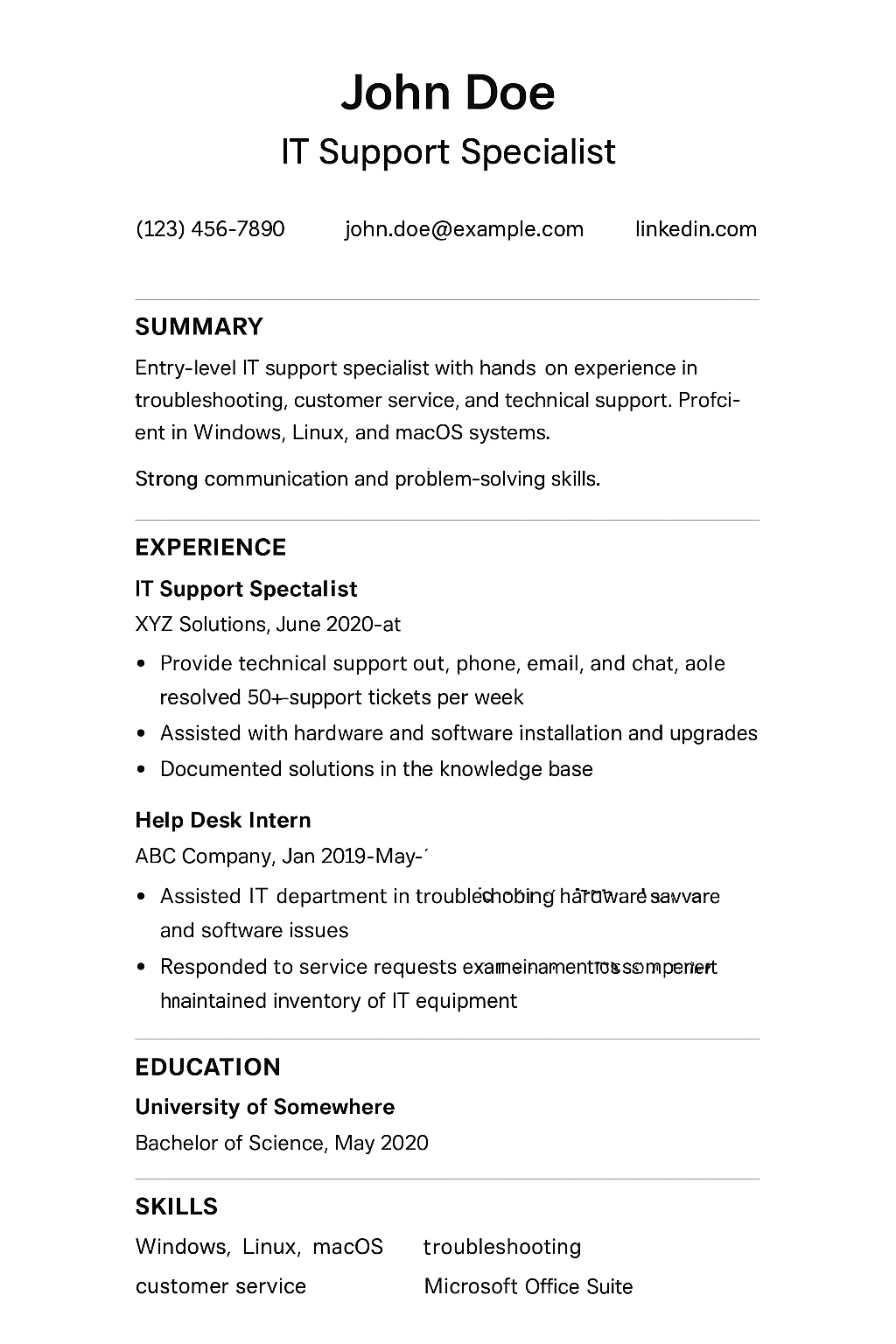
Your resume is your story on paper. Make it concise, relevant and remote-friendly. What to include:
Contact info + your LinkedIn URL + portfolio/GitHub link.
One-line summary: the role you want + your top skill.
Technical skills section: list tools, languages, platforms.
Projects or practical experience: Use bullets with outcomes (e.g., improved efficiency, solved a recurring problem).
Education / certifications.
Pro tip: For remote entry-level IT Job roles
Given you’re applying for remote work, highlight remote-friendly skills: written communication, time management, ability to use remote tools (Zoom, Slack, Jira, Git). Employers value that.
3. Narrow Your Target List and Research Contacts
Don’t spray-and-pray. Be selective. Focus on 20-30 companies, and dig into who you can connect with.
Questions to ask
Which companies hire remote entry-level IT roles?
Which teams within those companies are growing? (Check the company’s LinkedIn posts and job openings).
Who in my network could introduce me to someone at those companies?
Research contacts
Look for:
Recruiters or hiring managers on LinkedIn.
Engineers or team-members working in the area you’re applying to.
Alumni from your school or bootcamp working at those companies.
When you research, take notes: what tools they mention, what kind of projects they do, any keywords you can mirror.
4. Network + Ask for Referrals
Referral outreach is about relationships, not demands. A thoughtful approach works best.
Sequence you can follow
Step 1: Connection request
“Hi [Name], I’m an entry-level IT candidate interested in remote IT Support roles. I saw you work at [Company]. May I connect to learn about your experience?”
Step 2: Message After they accept:
“Thanks for connecting, [Name]. Quick question, what skills or interview topics helped you land your role at [Company]? I’m preparing for similar positions.”
Step 3: Referral ask When the conversation is good:
“I’m applying for [role link] and it seems like a strong fit given my experience with [skill]. Would you feel comfortable referring me or pointing me to the right person? I can share a one-page resume and short note you could use.”
Why this works
You’re first asking for advice. Once they engage, you ask for referral. You’re giving them an easy way to help, with resume + note ready.
5. Use the Right Platforms & Communities
Where you look matters.
Platforms to consider
LinkedIn Jobs , Use filters for “Remote” + “Entry Level”; use alumni filters.
Wellfound, Great for startups hiring remotely.
Indeed, Filter for remote and entry-level.
GitHub Jobs, Especially for dev roles.
Virtual meetups / conferences, Attend, ask questions, connect.
6. Prepare for ATS and Interviews
A good job entry-level is not just application numbers, you must be ready for the process.
ATS (Applicant Tracking System) tips
Use keywords from the job posting, the system looks for them.
Use standard headings: “Work Experience”, “Education”, “Skills”.
Submit format as recommended (PDF or Word) on the job site.
Interview preparation
Practice behavioral questions (use the STAR method: Situation, Task, Action, Result).
Review role-specific skills: ticket triage, command-line basics, Linux commands, REST basics, troubleshooting steps.
Prepare 2-3 stories where you show problem-solving + clear communication.
Set up your remote-interview space: quiet, good lighting, camera/mic checked.
YouTube Video
Here’s a great video that walks you through how to get a remote IT job with essentially no experience:
7. Follow-Up & Show Gratitude
Getting a referral is just part of the journey, how you handle what follows matters.
When someone refers you
Send a thank-you message immediately.
Update them about outcomes: “Thanks again for referring me, had the interview on Monday.”
It keeps them invested and is good relationship building.
When someone doesn’t answer
Send one polite follow-up after about a week.
If still no reply, move on. Don’t spam. Your time is better spent connecting with others.
8. Make the Referral Task Easy for Them
Referrers appreciate when you simplify their job. Provide a ready-to-use note for them to paste in.
Example note you can send them:
“[Your Name] is an entry-level IT professional with hands-on experience in [skill]. They worked on [project/outcome] and are a strong communicator who can work remotely. I recommend giving them consideration for [role].”
9. Quick Wins to Boost Your Chance
If you have a few short wins under your belt, your chances improve dramatically.
Build one short, real-world project: Maybe a ticket system demo, small web app, cloud deployment.
Earn one relevant certification: For example, CompTIA A+, AWS Certified Cloud or From Coursera.
Practitioner, or Google IT Support Professional Certificate.
Volunteer or support a small nonprofit/open-source project, real work experience counts.
10. Avoid These Common Mistakes
Here are a few traps that too many freshers fall into:
Sending generic outreach messages that feel copy-pasted.
Over-stating your experience, remember: referrals reflect on someone’s reputation.
Neglecting follow-up
Final Thoughts & Questions to Reflect On
Before you hit “apply”, ask yourself:
What specific IT role do I want (Support, SysAdmin, Cloud, Dev)?
Do I have concrete examples of hands-on work I can share quickly?
Who in my immediate network could give me a warm introduction if I asked?
By following these steps and staying consistent, you’re putting yourself in the best possible position, remote entry-level IT jobs are absolutely reachable.
For more useful insights, visit our blog and follow us on LinkedIn: