Why Do People Leave Your LinkedIn Connection Request Pending?
If you’ve ever sent a LinkedIn connection request, especially to someone you work with, and it just sits there… you’re not alone. And no, you’re not “childish” for noticing it. LinkedIn can feel personal because it’s tied to your career, your reputation, and how you’re seen at work.
So let’s talk through what pending LinkedIn connection request usually means, what it doesn't mean, how to handle it professionally (without spiraling), and how to set yourself up so LinkedIn supports your career instead of stressing you out.
First: What Does a Pending LinkedIn Connection Request Actually Mean?
A pending request simply means the other person hasn’t clicked “Accept” or “Ignore.” That’s it. LinkedIn doesn’t force a decision.
But in real life, a pending request can happen for a lot of reasons:
They don’t check connection requests often. Some people post and scroll but never manage their invitations.
They’re cautious about connecting with coworkers. Especially managers or HR-adjacent folks who treat LinkedIn like a public Rolodex.
They have a “clean network” rule. Some people only connect with clients, industry peers, or people they’ve worked with directly (even if they technically know you).
They missed the notification. LinkedIn notifications get noisy fast.
They’re waiting for a reason. Some people accept only if there’s a message attached (e.g., “Hey, great working with you on X”).
They’re weirdly status-driven. This happens too. Not everyone is emotionally mature about “who they connect with.”
Worth knowing: LinkedIn itself explains invitations and limits here (helpful context if you’re wondering what’s “normal” on the platform.)
The Big Question: Is It About You?
Sometimes yes. Often no.
Here are a few grounding questions that can help you reality-check the situation:
if you work with that person, are they generally slow with admin tasks? (Email replies, approvals, calendar invites, etc.)
Does they connect with direct reports in general? (if they are connected to the whole team, which makes this feel targeted, but double-check if there’s any pattern, maybe some are “followers,” not connections.)
Have you had any recent conflict or performance concerns?
Is your LinkedIn profile up to date and professional? Not because you need to “earn” a connection, but because some people are picky about what they want associated with their name/network.
Are they active posting/commenting, or just logging in? People can be “active” without looking at invites.
Also: LinkedIn doesn’t always show you the why behind a choice. If they intentionally didn’t accept, you might never get the real reason. So the move is figuring out what action best supports your career.
Retracting the Request: Was That Childish?
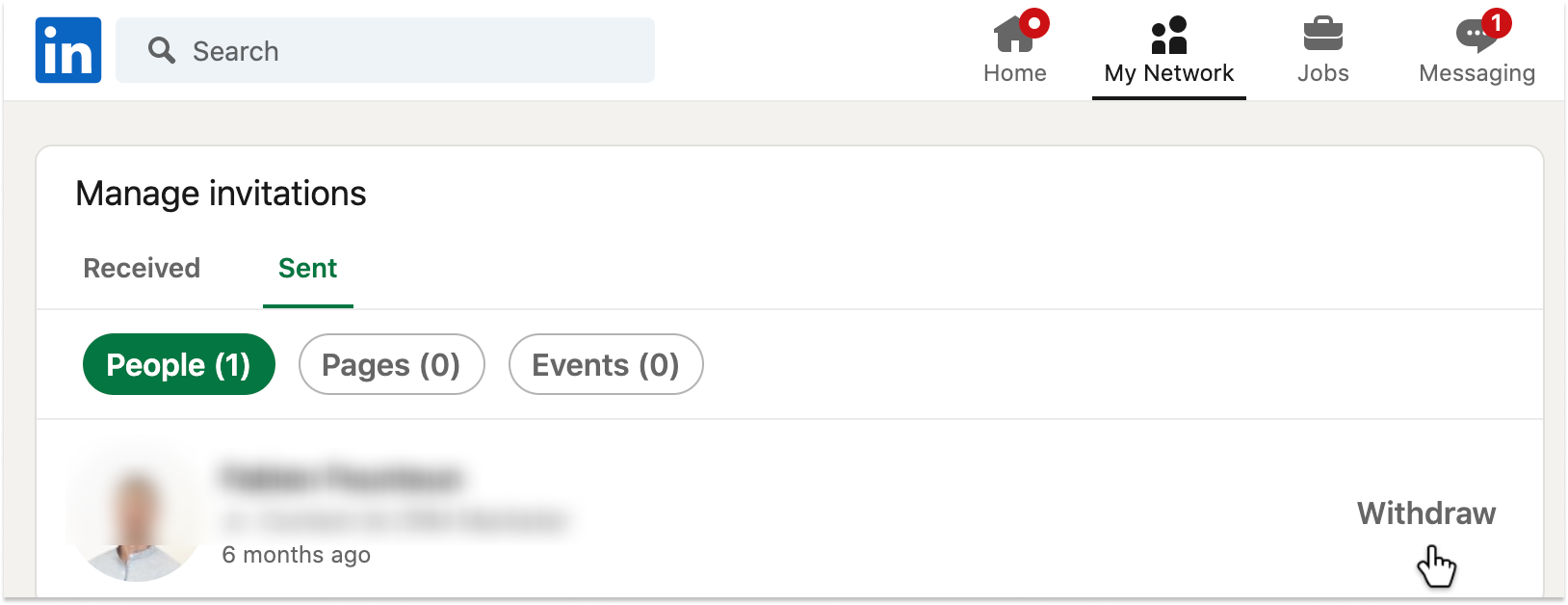
No. Retracting a request is a neutral, practical action.
Sometimes retracting is actually the most mature move because it:
stops you from checking the pending status,
removes the awkward “hanging” dynamic,
gives you control back.
LinkedIn even provides a straightforward way to manage sent invitations. If it was bothering you, retracting is a healthy boundary, not a tantrum.
What Should You Do Instead? (Practical Options)
Option 1: Do nothing and let it go
This is underrated. Not everyone needs to be in your LinkedIn network, even if you work together.
If it’s not affecting your day-to-day, you can simply keep things professional and focus on performance, relationships, and visibility in the ways that actually matter internally.
Option 2: Follow them instead of connecting
If your goal is just to stay aware of what they post (or show subtle professional interest), you can follow without connecting.
This keeps things low-pressure and avoids the “accept/ignore” dynamic. Here’s LinkedIn’s explanation of following vs connecting:

Option 3: Send a second request only if you can add context
If you already retracted, you can resend later, but only when you can attach a simple, normal reason.
Something like:
“Hi [Name], I realized I never connected with you on here. Appreciate your support this year, especially on [project]. Would love to stay connected.”
Keep it light. No guilt. No “you never accepted.”
Option 4: Ask offline (only if it’s truly necessary)
This is rare, but if LinkedIn connection matters for a legitimate reason (e.g., employer branding, sales enablement, recruiting, internal advocacy), you can ask casually:
“Quick question, do you prefer connecting with coworkers on LinkedIn, or do you mostly keep it client-facing?”
This gives them an “out” and avoids making it personal.
Option 5: Build your network laterally and externally
If the emotional sting here is “I’m not being acknowledged,” the best antidote is growing a strong network that doesn’t depend on one person’s click.
Some ideas:
Connect with colleagues you collaborate with cross-functionally
Connect with mentors, former teammates, clients, vendors, alumni
Engage in comments on industry posts (this drives profile views and inbound connections)
A simple resource on networking etiquette (worth reading if you tend to overthink this stuff):
If It’s Your Boss Specifically: Here’s the “Work Reality” Take
A boss not accepting your request can feel like rejection, but it doesn’t automatically equal disrespect or disapproval.
Some managers avoid connecting with direct reports because:
they don’t want employees to see their recruiter messages,
they want stricter boundaries between personal career moves and team management,
they treat LinkedIn as a public-facing brand tool, not an internal social layer.
Also, your year-end review matters more than LinkedIn. If your boss praised you and nothing negative was raised, trust the measurable feedback over the social media signal.
If you’re dealing with a problematic employee situation at work, keep those lanes separate:
Handle performance/conflict through your company process
Use LinkedIn as a professional presence tool, not a validation tool
Quick Checklist: How to Stop Pending Requests From Feeling So Personal
If this topic hits a nerve, try this quick reset:
Update your headline and About section so your profile reflects your value clearly
Turn off “Notify network” when making edits if you don’t want attention
Customize connection requests whenever possible (even one sentence helps)
Aim for quality over quantity (a smaller, relevant network is still powerful)
Remember: LinkedIn isn’t a performance review
If you want a video breakdown of better LinkedIn networking habits, this YouTube overview is a solid starting point:
The Bottom Line
If someone leaves you pending (yes, even your boss), you don’t need to chase, spiral, or assume you “suck.” The most career-protective approach is:
don’t interpret silence as feedback,
keep your work performance and relationships strong offline, and
use LinkedIn intentionally (not emotionally).
Read more of our blogs and follow us on LinkedIn: