If you’ve ever upgraded to Premium and thought, “How did my profile views look higher on free, then suddenly drop when I pay?”, you’re not imagining the pattern. It can feel suspicious.
In most cases, though, what you’re seeing is a mix of how LinkedIn displays the “Who’s viewed your profile” experience, how privacy settings (yours and other people’s) limit what can be revealed, and how stats are shown across different account experiences.
What counts as a LinkedIn “profile view”?
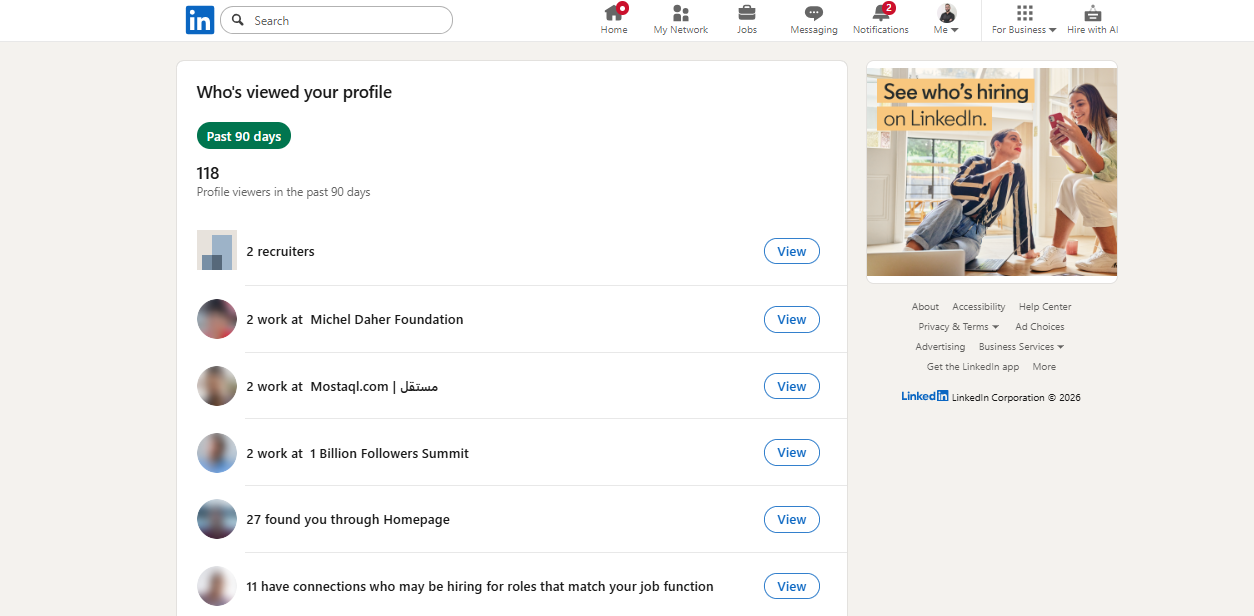
A profile view generally happens when someone visits your profile page, but the way that shows up to you can vary depending on where you’re looking:
The “Who’s viewed your profile” page is a viewer experience and can be limited by visibility rules.
Even Premium insights are still subject to the viewer’s privacy settings, so you won’t always see names.
So when you compare “hidden viewers before” vs “fewer views now,” you’re often comparing different displays of activity, not necessarily a real drop in interest.
Why you see “hidden” viewers on free?
On a free account, LinkedIn often shows limited viewer detail (for example: anonymous viewers or general characteristics) because the viewer chose private browsing or has settings that restrict identification.
When someone browses in private mode, their name and identifying details aren’t shared with the profile owner.
And yes, your own viewing choice matters too, because LinkedIn ties this to Profile viewing options in Visibility settings.
Why profile views can look lower right after you upgrade?
1) Your viewing settings may have changed
Premium onboarding nudges people to review settings, and it’s easy to flip something without noticing.
Go check your Profile viewing options (Visibility settings) and confirm what mode you’re using.
2) You might be comparing different time windows
If you upgraded after a busy posting week (or during a slower one), your brain is doing a “before vs after” comparison that’s not apples-to-apples.
A practical move: track your daily profile views for a fixed window (like 14 days) so you’re comparing the same time range.
3) Premium changes what you notice
When you pay, you check stats more often. That makes normal fluctuations feel louder and more meaningful, even if your overall visibility hasn’t actually changed.
4) “Hidden” doesn’t mean “unlockable”
Premium doesn’t override other people’s privacy choices. LinkedIn explicitly notes that Premium viewer insights remain subject to the viewer’s privacy settings.
So the “hidden viewers” you saw on free may still stay hidden on Premium, because they were always private.
5) Basic vs Premium viewer features differ
LinkedIn documents differences between basic and Premium behavior for the “Who’s viewed your profile” experience, and it even flags that Private Mode settings can affect what you see.
How you can test it without guessing?
If you want to treat this like a real experiment (instead of going by vibe):
Run a simple 2-3 week test
Keep your posting schedule consistent.
Avoid major profile edits during the test.
Record daily profile views and search appearances (same time each day).
What you’re looking for:
Do spikes align with posting days or comment activity?
Do search appearances stay stable while the viewer display changes?
If your visibility actions stay consistent but what you see shifts, it points to reporting/display differences or normal variance, not a sudden “punishment” for upgrading.
Practical ways to increase LinkedIn profile views (Premium or not)
Tighten your headline for search
Your headline is one of the strongest levers for relevant discovery. If someone searches your role + niche, your headline should match that intent.
If you want the official “how-to” for editing, LinkedIn shows the steps to edit your headline.
Make your About section skimmable
You’re not writing a biography. You’re making it easy for the right person to understand you fast:
short paragraphs
simple bullets
clear “what you do / who you help / proof / how to reach you”
Comment more, strategically
Consistent, thoughtful comments on relevant posts can drive profile clicks without forcing you to post every day.
Post more useful, less perfect
People click your profile when you:
explain a process
share a clear lesson
show a point of view with an example
If you want a general (not official) overview of LinkedIn content strategy, this tutorial is a decent starting point.
When Premium is worth it (and when it isn’t)?
Premium can be useful if you’re actively job searching, prospecting, hiring, or doing deeper research. LinkedIn’s Premium site outlines the plan types and what they’re designed to support.
But if your only reason is “I want every viewer name,” Premium can feel underwhelming because many viewers will still remain private by choice.
Bottom line
If your LinkedIn Premium profile views drop after upgrading, it usually comes down to:
privacy settings (theirs and sometimes yours)
comparing different time windows
differences in the “Who’s viewed your profile” experience across account types
If you want to pinpoint your case quickly, the biggest self-check is: did your Profile viewing options change around the upgrade date?
Read more on our blog and follow us on LinkedIn: