
How to Boost Credibility and Results For Your LinkedIn Profile?
If you just made your LinkedIn page and you’re wondering, “Okay, now what?”, you’re asking the right question. A lot of people create a profile or company page, add a photo, write one or two lines, and then leave it there. The problem is that LinkedIn usually rewards pages that feel complete, clear, and active.
So if you were asking for suggestions on your new LinkedIn page, here’s the honest answer: yes, there are probably a few things worth improving, and that’s completely normal. Almost every new page starts off a little empty. The good news is that a few thoughtful updates can make a big difference.
This guide breaks down the main things to look at, the questions to ask yourself, and the changes that can help your page look more trustworthy, searchable, and useful to the people who find it.
First, What Kind of LinkedIn Page Are You Talking About?
Before making changes, it helps to clarify what you’ve actually built. Are you working on:
A personal LinkedIn profile for job searching, networking, or building your reputation?
A LinkedIn company page for a business, brand, or service?
A creator/founder presence where your personal profile is doing most of the heavy lifting?
This matters because the advice overlaps, but the priorities are slightly different. A personal profile needs to build trust around you. A company page needs to build trust around what your business does. In many cases, both work better together.
Start With The Basics: Does Your Page Feel Complete?
This sounds obvious, but it’s the first thing people notice. If someone lands on your page, they’ll quickly ask themselves:
Who is this?
What do they do?
Who do they help?
Are they active and legitimate?
If your page doesn’t answer those questions in a few seconds, it probably needs work.
Here’s your basic checklist:
Profile or logo image: Make sure it’s clear, professional, and easy to recognize.
Banner image: Don’t leave it blank. Use it to reinforce your niche, service, or personality.
Headline or tagline: This should say more than just your job title or business name.
About section: Write a short and readable explanation of what you do, who you help, and why it matters.
Location, website, and contact details: Add them if relevant.
Experience, services, or company details: Fill these out so the page doesn’t feel unfinished.
LinkedIn has its own best-practice guidance for creating a stronger presence, and it’s worth reviewing if you’re starting from scratch: LinkedIn Help.
Your Headline Matters More Than Most People Think
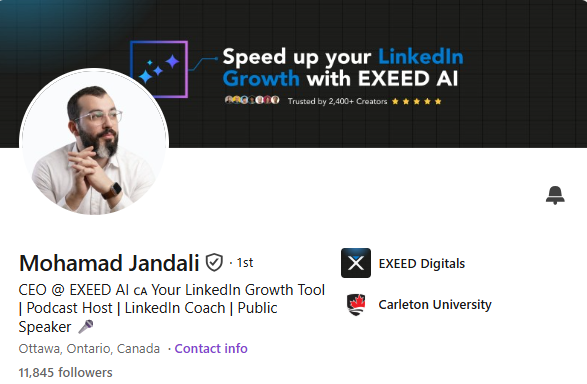
One of the most common mistakes on a new LinkedIn page is using a headline that’s too vague. If your profile just says something like “Founder,” “Consultant,” or “Business Owner,” it doesn’t really tell people enough.
A better headline usually includes:
What you do
Who you help
What result you help them get
For example:
Instead of: Marketing Consultant
Try: I help B2B brands improve LinkedIn content, lead generation, and brand visibility
Or for a company page:
Instead of: Digital Agency
Try: Helping brands grow through LinkedIn marketing, content strategy, and lead generation
Think of your headline like a quick text message to a stranger. It should be easy to understand, not overly clever.
Is Your About Section Actually Readable?
A lot of About sections are either too short or way too corporate. You don’t need to sound stiff to sound credible. A better approach is to write like a real person explaining their work clearly.
Try this structure:
Line 1: What you do
Line 2: Who you help
Line 3: How you help them
Line 4: What makes your approach different
Line 5: A simple call to action
For example: “I help small businesses build a stronger LinkedIn presence through better content, clearer messaging, and profile optimization. If your page exists but isn’t really working for you yet, that’s usually fixable.”
That kind of wording feels human, specific, and useful.
Don’t Ignore Visuals
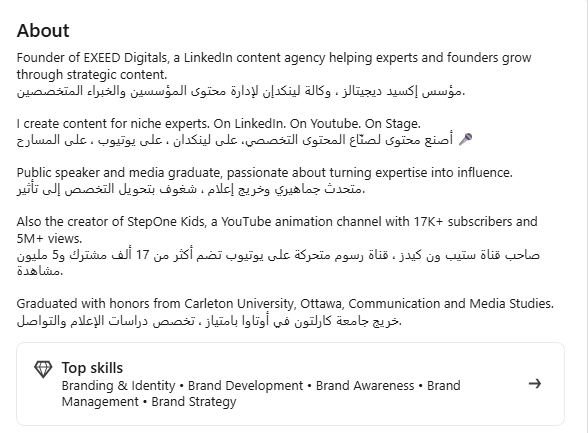
Your profile photo, logo, and banner shape first impressions fast. People may not say it out loud, but they do judge page quality based on design.
Ask yourself:
Does the image look current?
Is it cropped properly on desktop and mobile?
Does the banner support what the page is about?
Does the overall page feel clean and intentional?
If you’re not sure, look at a few strong examples from people in your industry. You can also review LinkedIn’s company page tips here: LinkedIn Pages Best Practices.
What Should You Post After Setting Up The Page?
This is where many new LinkedIn users get stuck. They create the page and then think they need to post something impressive right away. You really don’t.
Start simple.
Your first few posts can answer questions like:
Who are you or what does your business do?
Why did you start this page?
What kind of topics will you share?
What problems do you help solve?
What are you learning as you grow?
You do not need polished thought leadership from day one. What you need is consistency and clarity.
A simple content mix could look like this:
Intro post: Who you are and what you’ll talk about
Educational post: One useful lesson or tip
Personal insight: Something you’ve learned from work or building your page
Proof post: A result, testimonial, or mini case study
Engagement post: Ask a clear question people can actually answer
If you want ideas on what tends to work on LinkedIn, HubSpot has a helpful overview here: HubSpot LinkedIn Marketing Guide.
You can also use EXEED Digitals tools.
Make Your Page Easier To Trust
Trust is a big deal on LinkedIn. Even if your page looks nice, people still want signals that you’re real and active.
Some easy ways to build that trust:
Add a real profile photo
Fill in your work history or company information properly
Use a custom LinkedIn URL if available
Get a few relevant skills, endorsements, or recommendations
Link to your website or portfolio
Keep posting, even if it’s only once or twice a week
If you’re a business, make sure your company page connects properly to employee profiles too. That helps your page feel established instead of isolated.
Think About Searchability Too
LinkedIn is not just a social platform. It’s also a search engine in its own way. That means your wording matters. Use keywords naturally in your headline, about section, experience, services, and posts.
For example, if you want to be found for LinkedIn marketing, brand strategy, B2B sales, recruiting, or design, those phrases should appear in the right places. Don’t stuff them in awkwardly. Just make sure they’re there.
LinkedIn search optimization is often overlooked, but it can make your page far more discoverable over time. SEOsherpa has a useful article on LinkedIn SEO ideas here: LinkedIn SEO Tips.
A Few Questions To Ask Before Sharing Your Page in DMs
Since you mentioned sending the page in DMs, here are a few smart questions to ask yourself first:
Would someone understand what I do in under 10 seconds?
Does the page look active or empty?
Would I personally trust this page if I found it today?
Is there enough information for someone to respond with useful feedback?
If someone likes what they see, do they know what to do next?
If the answer to a few of those is “not really,” that’s okay. It just means you’re still in the setup stage.
A Practical Next-Step Plan
If you want a simple action list, do this:
Update your photo or logo
Create a banner that says something meaningful
Rewrite your headline so it’s specific
Clean up your About section
Add experience, services, website, and contact details
Publish 3 to 5 starter posts
Connect with relevant people in your field
Ask for feedback after the page looks complete
That alone puts you ahead of many brand-new LinkedIn pages.
Final Thought
If you just made your LinkedIn page, the main suggestion is this: don’t focus on making it perfect right away. Focus on making it clear, complete, and credible. People don’t expect a brand-new page to be huge. They do expect it to make sense.
Read more on our blog and follow us on LinkedIn:


